


Ventra
3.13.71K Reviews
App Specs
- Version
- 2.2.16
- Updated On
- License
- Free
- Downloads
- 1,000,000+
- Developer
- Chicago Transit Authority
- Categories
- Maps & Navigation
- Platform
- Android
Screenshots
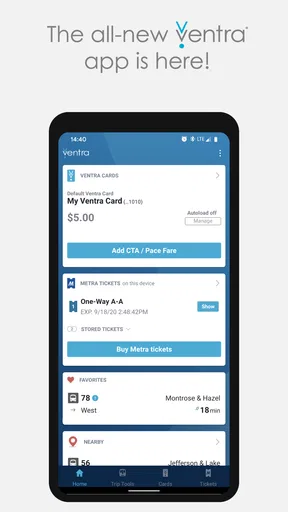
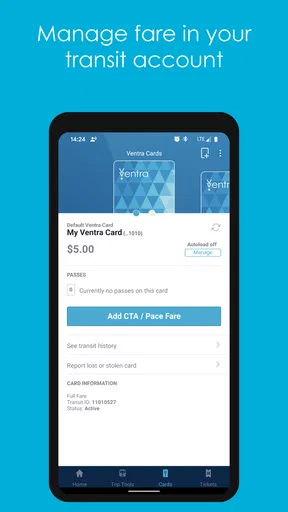
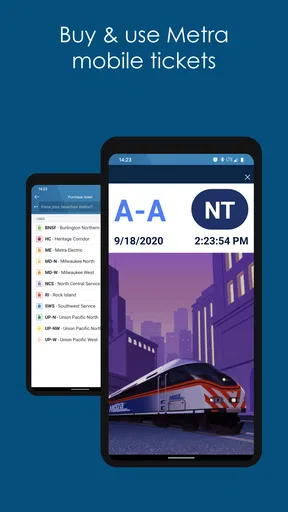
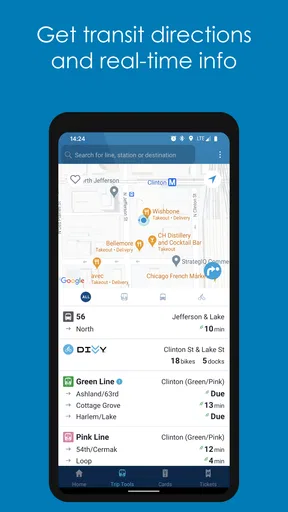
 Analysis by AppCompare
I judge a transit app by what it helps me do when I’m in a hurry: work out which service to take, check when it is due, and sort out payment without holding up the line. Ventra brings those jobs together for Chicago-area travel, with a particular emphasis on managing fares and checking arrivals. That focus makes it more useful to me as a day-to-day companion than as a general map of the city.
One place for fares and arrivals
Ventra is a free Maps & Navigation app from the Chicago Transit Authority. It covers CTA, Metra, and Pace in the ways described in its core offering: fare management, Metra ticket purchases, and arrival information. The practical benefit is having a place to check transit details and handle payment-related tasks instead of switching between unrelated tools every time a trip involves a different service.
That does not mean every traveler needs to make it their only navigation app. I see its strongest role as the local transit layer: useful when a journey depends on Chicago-area buses or trains, less compelling when I only need general walking directions or a broad map. Keeping that distinction in mind helps set sensible expectations before relying on it for a whole day out.
What the routine looks like
For an ordinary ride, I would check the relevant arrival information before leaving, then use the app’s fare-management tools to make sure I’m ready to pay. When Metra is part of the trip, the ability to buy a ticket in the same app is a particularly practical detail. It can reduce last-minute juggling, especially when I’m already heading toward a station and would rather not pause to work out which separate tool handles the ticket.
A useful habit is to check the travel details before I reach the platform or stop, rather than waiting until boarding is imminent. That gives me a moment to notice a changed arrival estimate and consider another option. Transit information is most valuable when there is still time to act on it, not when I’m already standing at the door of a departing bus.
Where it fits beside other tools
Compared with a general maps app, Ventra is more directly tied to local fare tasks and the services it covers. A general map may be more convenient for finding a destination, comparing walking routes, or combining transit with other kinds of directions. I would use that sort of app for the broad picture and turn to Ventra when I need a closer look at arrivals or need to manage a fare.
That division is not a weakness so much as a sensible way to use the tools. If I were visiting Chicago, I would plan the shape of an unfamiliar trip with a map I already know, then check Ventra for the transit-specific part. For someone who mainly travels by CTA, Metra, or Pace, opening one local app repeatedly may be simpler than trying to make a general navigation app handle every fare-related step.
Worth Reading Before You Choose

EA SPORTS FC Mobile 26 Is a Bigger Football Game, but It Takes Time

Flipboard Shows What News Apps Must Do Beyond the Feed

Switching to Android Auto Means Rethinking Your Driving Routine

Google Calendar Makes a Crowded Week Easier to Manage

Ludo King Makes the Most of the Minutes Between Plans

Baby Panda World Brings Quick Play to Modern Phones, but Its Game Library Feels Busy
Who gets the most from it
I think Ventra makes the most sense for people who regularly use Chicago-area public transportation, as well as visitors who expect to ride more than once and want to keep relevant fare tasks close at hand. The Chicago Transit Authority develops it, and its reach is reflected in its broad adoption: it has more than a million installs. It has an average rating of 3.1 from around 6,500 ratings, alongside about 3,700 written reviews, so the overall response is mixed rather than universally enthusiastic.
That mixed reception is a reason to approach it as a practical transit utility, not to assume that every part of the experience will feel polished for every rider. Someone who only needs a one-off route, prefers paper tickets, or already has a reliable payment routine may gain less from installing another app. I would also keep a backup plan for an important connection: checking an app is helpful, but I would not treat a changing arrival estimate as a guarantee.
Small choices that make it more useful
One low-effort improvement to the way I would use Ventra is to separate “planning” from “boarding.” I would look at the route and arrival information while I still have time to make a choice, then use the fare tools when I know which service I’m taking. That avoids rushing through both decisions at once. If a journey includes Metra, checking the ticket task before reaching the station is an especially sensible step, since it keeps the purchase from becoming a distraction at the last moment.
For a multi-leg day, I would also think about the return trip before setting off. The outbound ride is usually easy to focus on because I know where I’m going; the return can be less predictable if plans change. Keeping the app available for another arrival check can help me decide when to leave, while a general map remains useful if I need to walk to a different stop or navigate the surrounding streets. This is a simple division of labor, not a promise that one app can anticipate every change in plans.
A realistic Chicago travel day
Imagine I’m meeting someone across town and then continuing to a suburban destination. Before leaving, I use a map to understand the overall route and check Ventra for the transit details that matter: upcoming arrivals and, if Metra is involved, the ticket purchase. If the first leg is running differently from what I expected, I have a chance to reconsider before boarding. Later, I can check again rather than assuming the return will follow the same timing as the outbound trip.
The value in that scenario is not a flashy feature; it is reducing the number of separate decisions I have to make while moving. I can keep route discovery, local arrival checks, and fare preparation in their proper places. For a visitor, that can make repeat rides feel less improvised. For a regular rider, it may simply remove a few small points of friction from a familiar commute.
What to keep in mind
Transit apps depend on information being timely enough to act on, and I would leave room for a gap between an estimate and what happens on the street or rail line. If a connection is critical, checking early and allowing extra time is wiser than building a tight plan around a single displayed arrival. The app can help me make an informed choice, but it cannot remove the uncertainty that comes with real-world service.
It is also worth being clear about the difference between navigation and fare management. Ventra is useful for its Chicago-area transit role, but I would not expect it to replace a general-purpose map for every part of a journey. If I am walking through an unfamiliar neighborhood, comparing non-transit options, or planning travel outside the services it covers, another navigation tool is likely the better fit. Using both avoids asking a local fare app to do a broader job than it is meant to do.
Setup, compatibility, and expectations
The app has been available since November 18, 2015, and its current version is 2.2.14. It runs on Android devices with version 7.0 or later, and its content rating is Everyone. Those details make it relevant to a wide range of everyday riders, though compatibility still depends on the device someone plans to use. Since Ventra handles personal fare tasks, I would take a moment during setup to make sure I am using the account I intend to use rather than rushing through the process on the way to a stop.
A common practical question is whether Ventra is worthwhile for someone who rides only occasionally. My answer depends on the trip: if I expect to use CTA, Metra, or Pace several times, having arrivals and fare-related tools together can be convenient. For a single ride, a familiar map and whatever payment method I already use may be enough. Likewise, a person who does not travel on the covered local services has little reason to install it just because it is a transit app.
My recommendation before the first ride
I would try Ventra before a day when timing is tight, not for the first time while rushing to catch a train. Getting comfortable with where fare tasks and arrival information sit makes the app easier to use when I actually need it. I would also avoid assuming that checking a displayed time once settles the whole journey; a quick recheck before leaving is a more dependable habit than treating an earlier estimate as fixed.
For visitors, the main question is whether their plans involve enough local transit to justify learning another app. If the answer is yes, Ventra can keep useful Chicago-specific tasks close by. If the itinerary is mostly walking or occasional point-to-point travel, a general map may remain the more natural starting point, with Ventra used only when local fares or arrivals become relevant.
Overall, I see Ventra as a focused helper rather than a universal travel planner. Its best case is clear: I am moving around the Chicago area, need to keep track of relevant transit arrivals, and want fare management—including Metra ticket purchases—within reach. Its limitations matter too: an arrival estimate is not a guarantee, and broader navigation may be easier elsewhere. Used with those boundaries in mind, it can make routine trips feel more organized without asking it to solve every part of getting around.
Getting Started with Ventra
First things first, downloading and setting up Ventra was a breeze. Available on both Android and iOS, you can find it in the Google Play Store or Apple’s App Store. Once installed, the setup process was pretty straightforward. I had to create an account or sign in with my existing one, and then I was ready to explore.
What I loved right off the bat was how user-friendly the interface is. You don’t need to be a tech wizard to navigate through the app. The main screen gives you quick access to all the essential features, like checking balance, reloading cards, and planning your trips.
A Comprehensive Transit Companion
One of the standout features of the app is the trip planning functionality. With real-time tracking and estimated arrival times, it’s like having a personal transit assistant in your pocket. I tried planning a trip from downtown to the suburbs, and the app didn’t disappoint. It provided several route options along with their respective times and costs. Pretty handy if you ask me!
The integration with Google Maps for route suggestions is a nice touch. It offers a seamless experience when you’re trying to figure out the best way to get from point A to point B. Plus, you can save your favorite routes for quick access later on.
Contactless Payments and More
One of the features that really caught my attention is the ability to make contactless payments. With just a few taps, I could add funds to my digital card and use my phone to tap and go. It’s super convenient, especially if you’re someone who often forgets to carry cash or cards. And let's be honest, in today's world, contactless is not just a convenience—it's a necessity.
Another cool aspect is the ability to manage multiple cards. Whether you have a personal card, a work card, or you're managing cards for your family members, the app makes it easy to keep track of them all.
Notifications and Alerts
Nobody likes to miss their train or bus, right? Ventra’s notification system ensures that you’re always in the loop. You can set up alerts for when your balance is low, when your pass is expiring, or even get notified about service disruptions. I found these alerts to be incredibly useful, especially during rush hours when every minute counts.
The app also allows you to check service status, so you’re always aware of any delays or changes in schedules. It’s like having a direct line to all the latest transit updates.
My Two Cents
So, what's the final verdict? Ventra is a solid transit app that delivers on its promises. It's packed with features that make commuting in Chicago not just bearable but genuinely convenient. Whether you're a daily commuter or an occasional traveler, there's a lot to appreciate here.
The app isn’t without its quirks, though. Occasionally, I experienced slight delays in real-time updates, but nothing deal-breaking. Overall, the convenience and functionality far outweigh these minor hiccups.
If you're in the Windy City and rely on public transportation, I’d say give Ventra a shot. It’s like having the city’s transit system in the palm of your hand, and who wouldn’t want that?
Pros
- User-friendly interface for easy navigation.
- Real-time bus and train tracking.
- Secure payment options integrated.
- Customizable alerts for routes.
- Offline access to saved schedules.
Cons
- Occasional app crashes reported.
- Limited customer support hours.
- Battery consumption can be high.
- Updates can be slow to release.
- Not all routes have live tracking.
FAQs for Ventra
What is Ventra and how does it work?
Ventra is a mobile application designed to simplify the way users pay for public transportation in select cities. By linking a payment method, users can purchase transit passes and manage their travel without needing physical tickets. The app provides real-time updates on schedules and routes, enhancing the commuting experience.
Is Ventra available for both Android and iOS devices?
Yes, Ventra is available for download on both Android and iOS platforms. Users can find it on the Google Play Store for Android devices and the Apple App Store for iOS devices. The app is regularly updated to ensure compatibility and functionality across different operating systems.
How secure is the Ventra app for financial transactions?
Ventra ensures a high level of security for all financial transactions. It uses encryption technologies to protect users' personal and payment information. Additionally, the app complies with industry standards and regulations to safeguard data and prevent unauthorized access, making it a reliable choice for commuters.
Can I use the Ventra app offline?
While the Ventra app requires an internet connection for purchasing tickets and accessing real-time transit information, some features may be available offline. For instance, previously purchased tickets can be accessed without a connection, ensuring users can still board transit services even if connectivity is lost.
What should I do if I encounter issues with the Ventra app?
If you experience problems with the Ventra app, there are several support options available. Users can contact customer service directly through the app or visit the Ventra website for troubleshooting guides and FAQs. Keeping the app updated can also resolve many common issues.


